Friday, April 8, 2011

Governance Grows Up


by Erin Kissane on April 7th, 2011 (reposted from braintraffic.com)


One of the things that's consistently difficult about governance—the long-term management of content—is keeping sufficient resources available after a site launches.
If you think finding people to write, review, and revise content leading up to launch is tricky … you're completely right. But it's still easier than keeping those people available later on, once the adrenaline rush of launch has subsided and the never-ending process of reviewing and improving site content has kicked in.
One thing that helps is a set of good tools:
  • A style guide that genuinely supports your culture as well as providing clear mechanical guidelines;
  • A CMS that supports your workflow and makes publishing easier;
  • Page tables or content templates that clarify the fundamental purpose of each major piece of content.
But tools only work when there’s someone to use them.

People are really, really busy

The people who have the subject-matter expertise required to create and maintain content are often some of the most overworked employees in any organization—which is saying a lot, given the larger corporate trend toward over-commitment.
Content work—and especially online content work—is  more often presented as an "extra" job for subject-matter experts and anyone else expected to contribute content whose title isn't "web editor." And when the work is presented as an extra task that isn’t central to employees’ job descriptions, it tends not to get done.
So although most content strategists aren’t especially well versed in the management side of organizational dynamics, the problem of governance forces us to consider ways of reserving time, freeing up resources, and recognizing effort. And that’s why a video made by content strategy thinkers at Autodesk has cheered me up so much this week: it does so much right, and sets a wonderful example for dealing with this seemingly intractable problem.
Here’s the video:
What’s so wonderful about this approach is that the video itself is aimed at an internal audience. It explains the purpose and importance of the Autodesk content strategy initiative in clear, unpretentious terms and then goes a step further by breaking down the ways in which the efforts of people who contribute to the initiative will be recognized and considered as a part of their overall performance.
(The underlying content strategy is also based on what appears to be a very smart, disciplined system of measuring and refining content over time, but that’s another whole conversation.)

Dragging governance into the mainstream

The problems that this video addresses so directly have been around for ages, and we’ve all had to find ways of trying to resolve them. And because it’s not yet a given that organizations know they need to staff and support their online communications, many of our attempts have necessarily been workarounds.
For example, when a company really needs more people to handle content work, but can’t hire another expert, I’ve sometimes suggested hiring a part-time administrative person to help ease the burden of paperwork and free existing experts to spend more time on content. And a great web editor can often perform a certain amount of resource-allocation magic through sheer force of personality. But these are temporary solutions, not sustainable long-term plans.
By bringing the realities of content-related resource allocation into the mainstream of performance management, the Autodesk team has provided a clear example of simple ways of bringing content development and governance into the core of an organization. And their strategy was developed within, rather than being brought in from outside, which is a great sign. When organizations begin to understand content strategy at that level, the whole CS conversation can become more sophisticated.

Circle up

Whether you do content work within an organization or as a consultant, you’ve probably bumped into governance challenges. So let’s talk. Are you finding it easier to explain the need for long-term content resources, or are things holding still for you? What kinds of strategies are working for you?


Thursday, April 7, 2011

5 Things You Need to Know about Content Strategy


5 Things You Need to Know about Content Strategy

There’s been a ton of great discussion about content activities, methodologies and deliverables. For most of us, that makes up the bulk of our work. But if you don’t have a conceptual framework for those activities, I’d argue that you’re not really practising content strategy. Here are five ways to think about content strategy that will ensure your content efforts are always strategic.

What is content strategy, anyway?

Content strategy is not a single solution or deliverable. It’s a process and a mindset. If you approach your content marketing initiative knowing that it will constantly evolve, and that you’re guiding its evolution, then you’re practising content strategy.
The de facto definition for content strategy comes from Kristina Halvorson, founder of Brain Traffic, and author of Content Strategy for the Web. She describes content strategy as “planning for the creation, delivery, and governance of useful, usable content.”
Content strategy evaluates business and customer needs and provides strategic direction on how improved content and content processes can help to achieve specific objectives. It’s a continual process of improvement.
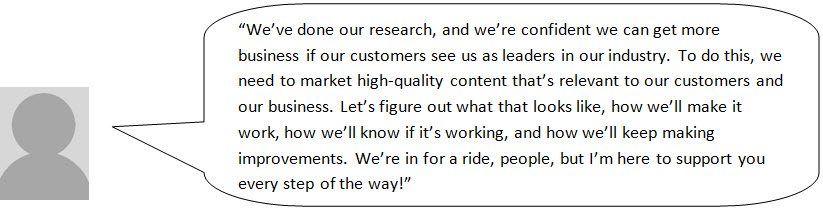
Here’s an example of two people getting ready to implement a content-marketing initiative, but only one of them is practising content strategy:
This is not content strategy.
This is content strategy.

Is content strategy really that important?

Yes, it is.
Look at the two people above. Who do you have more faith in? Content strategy requires more time and resources upfront, but your content-marketing initiative is much more likely to succeed with a solid strategy supporting it.
Content strategy activities are scalable and can be modified to fit any budget. You don’t necessarily need a large, formal content strategy. You just need to take the time to think things through and determine your goals, resourcing, workflow and success metrics, which can save you from the high cost of ineffective content. You can’t expect to get where you want to go if you don’t know where that is, what you need to do to get there, or how to even recognize it if you stumble across it. What’s more, way too many companies are becoming more strategic in their content processes. You can’t afford to be left behind.

OK, so how do I strategize content?

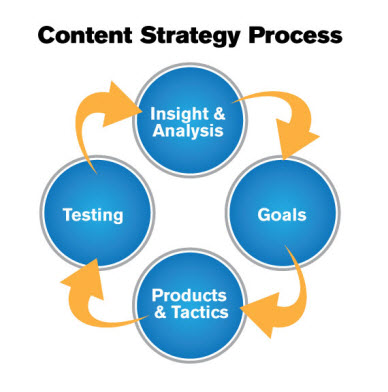
You think about content through every stage of every project. Here’s a basic content strategy cycle:
Simple, right? Yup, it is. But…

The devil is in the details

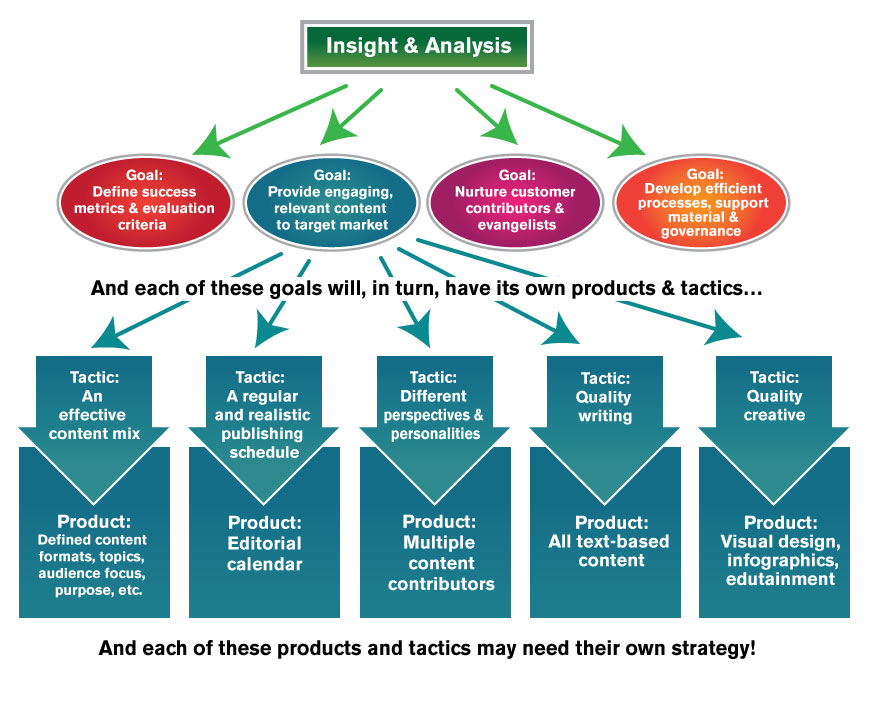
Content strategy starts with the big picture and then drills down to a granular level that can be implemented and measured. It encompasses everything that impacts content, including workflow and governance.
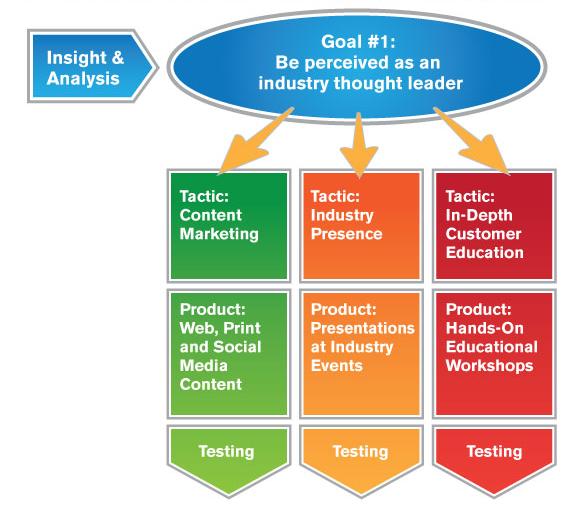
Here’s a hypothetical example of one possible high-level goal, and how it may break out into multiple overlapping goals, tactics and products:


The complexity is in the layers
The content strategy process is not so much circular as it is spiral, starting at the big vision and then repeating at each stage as you drill down to more details. To make matters worse (or more fun!), content strategies, tactics, processes and even specific pieces of content are often shared between projects, products and business units.
For example, as a content marketer you’re going to have a strategy and guidelines for promoting your content through social media. But your company’s support team may also have a social media presence, along with corporate communications. And each business focus will have different goals, tactics and resourcing. However, in the eyes of your customers, you all share a single social media “product” or presence. A good content strategy looks across organizational silos and integrates the different business needs, goals and tactics. It makes sure that the end product promotes consistent, effective and efficient user experiences and business processes.
So now, when you approach your content marketing initiative, look at it from a content strategist’s point of view. Ask tons of questions. Validate and test the answers. Define specific goals. Cross corporate silos and attend to details. Imagine what’s possible and create a realistic plan to get there. Be creative. Have fun. And be very, very patient.

Using the Valuable Content Checklist: A Step-by-Step Guide for Different Content Types


Using the Valuable Content Checklist: A Step-by-Step Guide for Different Content Types

We are all looking for the silver bullet that will make our content sparkle. What if from the time of content creation we already had the benchmarks in place that we know forms valuable content?
Yesterday, I introduced the Creating Valuable Content Checklist, which I use to quantify what makes content valuable to our content consumers.  Today I’ll explain the steps in each of these benchmarks. 

Findable content

When creating your content, you must remember that unless something is emailed to users, they probably need to find it (and even then things can get lost in an inbox!). Therefore, you must make sure that you’ve done everything in your power to use the right SEO best practices to write or create findable content.
The steps below assume that you have already done keyword research on your project. Based on the goals and user research, you should choose the keywords that you think will be most effective for your content. If you need help finding the right keywords, check out this post on how to find the right keywords for your content marketing efforts.
For text on web pages
  • Use only one h1 and multiple h2 tags on your web pages because  they benefit search engines ranking and they help break up text on a page. Make sure you highlight them in the copy deck (or whatever system you use to move content from creation into production) so that the person laying out the content understands how they should be encoded. Use h3 tags if necessary, but understand they won’t get you the same bang for your buck in terms of SEO results that h1 and h2 tags will.
  • Customize the metadata (title tag, keywords and descriptor tag) so it describes the content on the page, according to your keyword research.
  • Include links to other pages on the site to increase the content value that search engine spiders assign to your pages (spiders are the robots that crawl through your site).
  • Include alt tags on your photos and other images so they appear in image searches.Describe the picture in the image (because alt tags were first designed for the visually impaired) but also use them to plug your content. For instance, if you have a picture of doctors performing surgery, the alt tag could be“The doctors at Sweet Valley Hospital in Sweet Valley, California, are experts in separating identical twins in a surgery,  known as identical separation, shown in this photo.”
For video
Post your video on YouTube and/or Facebook to increase the likelihood it will be seen. I like using YouTube because it allows you to accurately count the views. Regardless of what platform you use, you need to tag the content so it can be found:
  • Include possible keywords in your title.
  • Provide  a detailed, keyword-rich summary.
For audio
  • Consider distributing your audio in different formats, such as mp3, wav and wiff so it’s available to different audiences.  If your potential customer doesn’t have the required format to listen to the audio file, then your whole goal of creating and distributing the content has been stymied during delivery.
  • Create a detailed summary and title where the content will be downloaded. For some delivery vehicles, that’s the system it’s stored in, like iTunes. For others, it might be the page you post the file on.
  • House each audio clip on a relevant content page, so the text and audio support each other in SEO efforts by demonstrating relevant content to the search engines.

Readable content

Once users find your content, do they consider it to be readable? While this only applies to written content, this is the primary way people consume info, so it’s an incredibly important category.
When considering readability, the most important thing to consider is that users scan until they find the content they need. Any great Web conversation with your user respects their time. Therefore, consider using:
  • Inverted pyramid style of writingThe inverted pyramid style of writing:  The most important facts should be at the top. For an example of this, see the figure produced using eyetracking software.  You can see where the user’s eyes scanned on the page:  see how that shape follows an inverted pyramid?
  • Chunking: Keep paragraphs short. I follow the rule of three:  no more than three sentences in a paragraph, and no more than three paragraphs under one heading.
  • Bullets and numbered lists:  When people want to consume information quickly, lists and bullets are helpful.
  • Consistent language: By keeping content consistent, you avoid confusing your users.  For example, how do you refer to your business, company or institution on a page? If you keep switching back and forth from your name to the use of the term “us,” it’s going to confuse your customers. Keep it consistent. Use a style guide to help everyone get on the same page.

Understandable content

Creating content that users really understand is challenging when subjects are complex. In healthcare, where I do a tremendous amount of consulting and content creation, I am very aware of this. Many times I write on an eighth grade reading level, and even that might be too elevated for my readers.
So how can  you create understandable content, no matter what industry you are in?
  • Choose the right content type. For example, if users have an “aha” moment when seeing something sketched out, use a visual medium such as a video or a slideshow instead of written text.
  • Create user personas for your different user audiences, and match the level of the content’s complexity to the user’s ability to understand it.
  • Always provide context. Even if you think it might sound condescending, consider explaining even the most basic concepts to your users. You never know where someone is jumping in on the conversation.  Build a contextual roadmap into your content at all times.
  • Apply a standard reading level to your content for each project and stick to it. This should be based on your users’ personas and market research. There is a function in Word for testing reading levels—you may want to experiment with that scoring. Or, find a person on that reading level and test them. You may be surprised to hear what they do and don’t understand.
  • Provide valuable information to the user. This could be new information or a new way of articulating an existing idea. Sometimes metaphors help people understand better.

Actionable content

Obviously, you are creating content so your users act upon it. How can you ensure this while creating content?
  • Include an obvious call to action.
  • Make it easy for users to comment and ask questions, both publicly and privately. For instance, enable blog comments or direct people your company’s Facebook page.  If you accept comments via your “Contact Us” page, make this page easily accessible. Ask your users to share the content by including: “Please share this content with those you think might enjoy it.”
  • Provide links to relevant content or program your content management system (CMS) to provide options to other content that users have liked.
  • Include a list of actionable items at the top if the content is long (remember the inverted pyramid style of writing that helps make content more readable). For example, if you are writing about diabetes care, add three bullets at the top that define diabetes and explain how you can control it.

Shareable content

One of the best ways to have your content spread is to have your readers share it because people trust their peers more than brands. How can you entice more of your users to share content?
  • Consider provoking an emotional response in your readers. When I first started writing articles on content marketing, one of my editors told me, “People are more likely share controversial stuff.”
  • Provide a reason to share—perhaps you actually illustrate the benefit of sharing the content within the story of the content. For example, you may to tell a story about how sharing health information with each other helped one family increase their exercise efforts.
  • Ask them to share.
  • Make sharing easy. (Work with your developers to research and decide on which sharing widget is best for your organization).
  • Allow users to personalize the share. For instance, when I retweet things, I like to edit them, so I can add hashtags or reference another source. If I can’t, I feel frustrated.
As Gawande explained, most professions are resistant to checklists because “we believe our jobs are too complicated to reduce to a checklist.” If doctors, project managers of major construction projects and the World Health Organization were convinced by the use of checklists, then why shouldn’t we be?
Do you have experience using checklists in your content marketing? I’d love to see your examples. Or, let me know what you may change in this checklist.